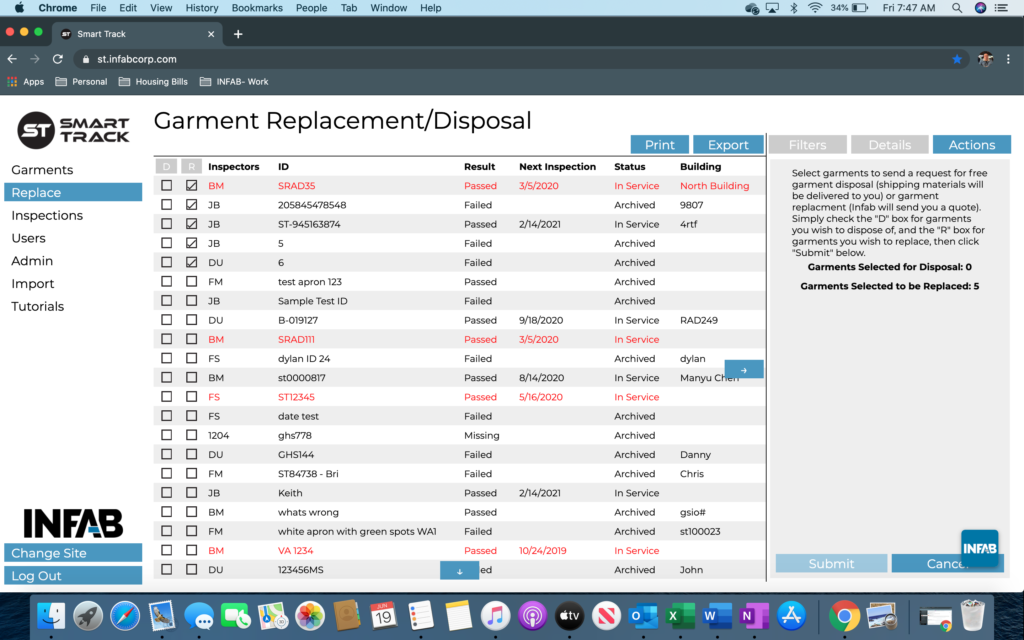
How To Replace & Dispose
Step 1: From the “Garments” inventory page, you will need to scroll over to the toolbar. This can be found on the left-hand side of the page. Select “Replace”.
Step 2: From this page, you can either scroll through your list of garments or utilize the Filter function to find your desired product.
Step 3: Once the correct garment has been identified, mark the desired checkbox that corresponds with your outcome. EX: D = Dispose, R = Replace.

Step 4: Once you have selected your garment, you will see the “Actions” tab auto-populate on the right-hand side of the page. This page will indicate the action that is about to taken and it will also tell you the number of garments you are wishing to either dispose or replace.
Step 5: Press “Submit”.